
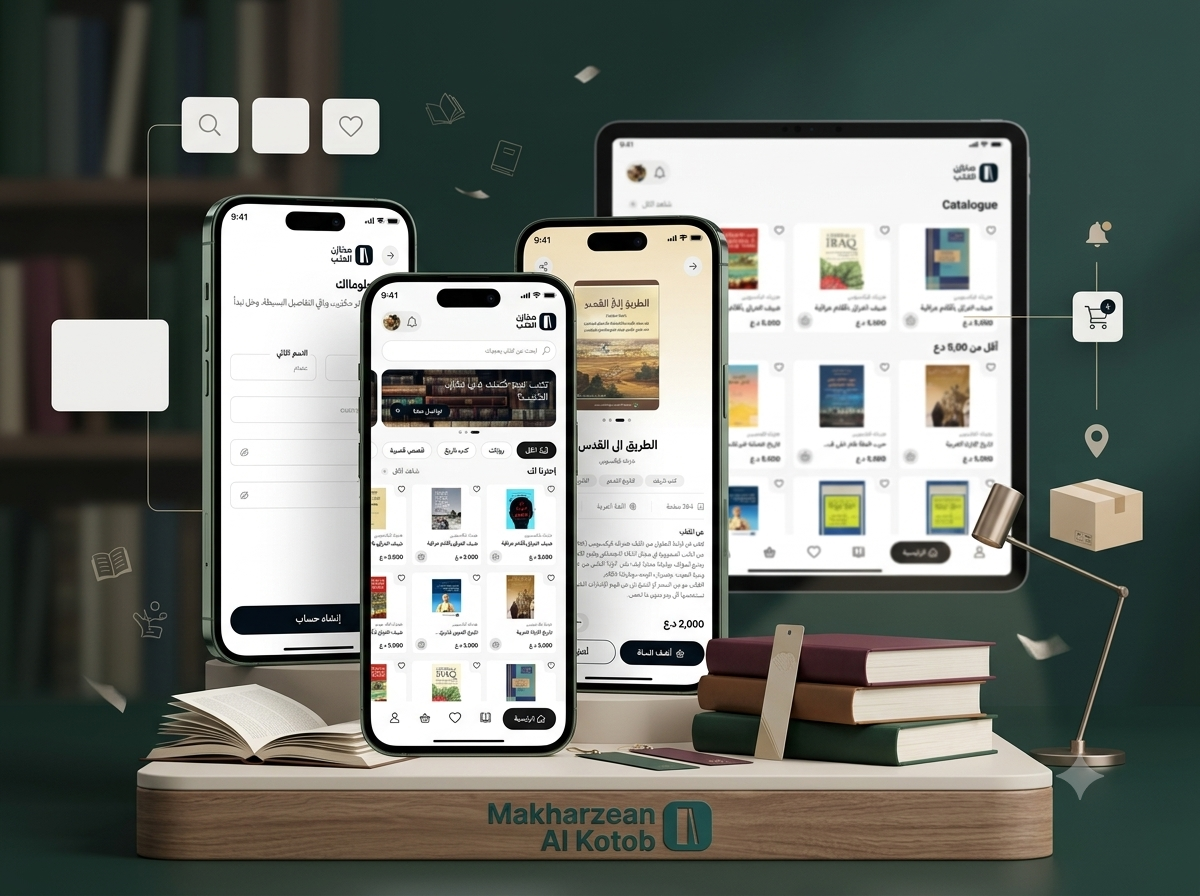
Makhazen Al Kotob
An Arabic-first mobile e-commerce application for discovering, browsing, and purchasing books, featuring structured categories, advanced filtering, title and author search, book details, favourites, shopping cart management, delivery information, order confirmation, notifications, saved addresses, and customer accounts.
- Client : Makhazen Al Kotob
- Duration : Under Development
- year : 2026
Arabic Book Discovery and E-Commerce in One Mobile Application
Makhazen Al Kotob is an Arabic mobile application designed for discovering, browsing, and purchasing books through a simple and organised digital experience.
The application combines book discovery, category browsing, advanced filtering, search, book details, favourites, shopping cart management, delivery information, order confirmation, notifications, and customer account management in one mobile platform.
The experience is designed primarily for Arabic-speaking readers and uses a clear right-to-left interface that makes browsing large book collections simple and accessible.
Customers can explore recently added books, browse titles by category, review recommendations, search by title or author, save books to favourites, add books to the cart, enter delivery details, confirm orders, and manage their accounts from the same application.
 |
 |
Project Overview
Makhazen Al Kotob was developed to transform traditional book purchasing into a complete digital journey that begins with discovery and continues through checkout, delivery information, order confirmation, and customer communication.
The user journey begins with a branded splash screen, followed by onboarding screens that communicate the value of reading and introduce the platform experience.
After entering the home page, readers can discover recently added books, categories, promotional banners, recommendations, search tools, favourites, shopping cart, notifications, and account features.
The application supports a variety of reading categories, including novels, literature, history, religion, thought, philosophy, politics, biographies, culture, children’s books, and other categories configured by the administration team.
Detailed book pages provide customers with the information required to make a purchase decision, including the cover, title, author, publisher, publication year, category, description, price, and quantity.
The application also supports saved addresses, delivery information, order summaries, notifications, profile management, and a complete password recovery workflow.
The Business and Operational Challenge
Traditional book purchasing may require customers to visit several bookshops, search through social media pages, or contact sellers manually to ask about prices and availability.
Customers may need to request information separately about authors, publishers, book categories, publication details, new arrivals, delivery options, and order progress.
Bookstores also face the challenge of displaying a large number of titles while helping readers discover relevant books without creating an overwhelming experience.
Arabic readers require a search and browsing experience that presents categories, titles, filters, and content in a clear right-to-left interface.
The bookstore also requires centralized management of books, covers, authors, publishers, categories, pricing, stock, customers, addresses, orders, and notifications.
The project therefore required an organised Arabic mobile platform combining book discovery, search, favourites, cart management, purchasing, delivery information, and customer accounts.
The Thotix Solution
Designed and developed by Thotix, Makhazen Al Kotob provides a complete Arabic mobile experience that connects readers with an organised book catalogue.
The user journey was structured to begin with application introduction, continue through discovery, search, category browsing, details, favourites, and shopping cart management, and end with delivery information and order confirmation.
The application provides discovery tools including title, author, and keyword search, search suggestions, category browsing, and filters based on price, author, publisher, and other configured values.
The commerce experience includes detailed book pages, quantity selection, Buy Now, Add to Cart, cart summaries, saved addresses, order confirmation, and successful-order screens.
The connected administration system supports book, author, publisher, category, pricing, stock, banner, recommendation, customer, order, notification, and onboarding-content management.
Key Application Features
Splash Screen
- Brand Introduction: Present the Makhazen Al Kotob identity when the application opens.
- Professional First Impression: Begin the experience through a clean visual screen.
- Application Preparation: Support loading required information before entering the platform.
- Consistent Experience: Maintain the application identity from the first interaction.
Onboarding Experience
- Reading Journey: Present books as the beginning of new experiences and knowledge.
- Book Discovery: Encourage users to explore useful and valuable titles.
- Knowledge Building: Communicate the role of reading in personal development.
- Book Collection Introduction: Introduce the large reading world available inside the application.
- Navigation Controls: Support Next, Back, and Skip actions.
- Start Actions: Continue to the platform or create a new account.
Home Page
- User Profile Image: Display account identity on the main screen.
- Search Bar: Provide quick access to books and authors.
- Promotional Banner: Present campaigns, collections, and new books.
- Category Shortcuts: Open major book sections quickly.
- Recently Added Books: Highlight the latest titles.
- Book Cards: Display covers, titles, prices, and favourite controls.
- Shopping Cart Access: Open the user’s current book selection.
- Notification Access: Review book and order updates.
- Bottom Navigation: Move between the most important application sections.
Promotional Banners
- New Book Promotion: Highlight recently added titles.
- Selected Collections: Present books connected to a theme or category.
- Reading Campaigns: Encourage customers to explore new content.
- Seasonal Offers: Promote bookstore campaigns.
- Featured Authors: Highlight selected writers and their books.
- Direct Navigation: Connect the banner to a book, category, or offer.
Recently Added Books
- Latest Titles: Help readers discover recently published or added books.
- Book Cover: Present a clear visual for each title.
- Book Title: Display the name in a compact format.
- Price: Present the current purchase value.
- Favourite Control: Save the book for later.
- Quick Details: Open the selected book page directly.
Book Categories
- Novels: Browse local, translated, and literary fiction.
- Literature: Discover literary and critical works.
- History: Explore historical books and civilizational studies.
- Religion: Browse religious and related intellectual works.
- Thought: Access cultural and intellectual publications.
- Philosophy: Explore philosophy and logic titles.
- Politics: Browse political and analytical works.
- Biography: Discover life stories and influential figures.
- Culture: Access general cultural and knowledge books.
- Children’s Books: Browse titles created for younger readers.
- Additional Categories: Support new sections configured by administrators.
Category Filters
- Category Selection: Display books from one or several categories.
- Price Range: Define minimum and maximum pricing.
- Availability or Condition: Filter according to configured book status.
- Author Selection: Display titles by selected writers.
- Publisher Selection: Filter books according to publishing house.
- Language or Type: Support additional configured filter values.
- Sorting Options: Organise results according to available criteria.
- Apply Filter: Update book results using the selected values.
- Reset Filter: Remove selections and return to the full list.
 |
 |
Search
- Book Title Search: Find a specific title.
- Author Search: Display books written by a selected author.
- Keyword Search: Locate books through related terms.
- Category Terms: Search using a book type or section.
- Recent Searches: Display previously used search terms.
- Suggested Books: Present relevant titles.
- Clear Search: Remove the current term and begin a new search.
Search Suggestions
- Book Suggestions: Display likely matching titles while typing.
- Author Suggestions: Help users reach writers quickly.
- Category Suggestions: Direct users to relevant sections.
- Related Phrases: Present similar search terms.
- Faster Discovery: Reduce the time required to locate a book.
Empty Search State
- Clear Message: Explain that no matching result was found.
- Polished Experience: Prevent the interface from appearing broken.
- Recommended Books: Present alternative titles.
- Try Another Search: Encourage the user to use a different term.
- Continue Browsing: Provide options to return to the catalogue.
Book Listing Cards
- Book Cover: Display the cover inside each card.
- Book Title: Present the name clearly.
- Price: Show the current purchase value.
- Favourite Icon: Save the book to a personal list.
- Availability: Display purchase status where configured.
- Quick Access: Open book details from the card.
- Compact Layout: Present several titles on one screen.
Book Details
- Book Cover: Present a clear primary image.
- Book Title: Display the complete title.
- Author: Present the writer’s name.
- Publisher: Display publishing information where available.
- Publication Year: Present the release year.
- Category: Connect the title to its section.
- Description: Provide detailed information about the book.
- Price: Display the current purchase value.
- Quantity Selector: Choose the required number of copies.
- Add to Cart: Add the book to the shopping order.
- Buy Now: Move directly to the purchase workflow.
Book Description
- Book Subject: Explain the main field or topic.
- Story or Theme: Provide a suitable summary.
- Main Ideas: Introduce the central concepts.
- Intended Reader: Describe the audience that may benefit from the title.
- Context: Provide useful background information.
- Publishing Information: Present relevant edition details.
 |
 |
Quantity Selection
- Increase Quantity: Add additional copies.
- Decrease Quantity: Reduce the selected number.
- Current Quantity: Display the selected value.
- Total Update: Recalculate cart cost.
- Quantity Validation: Prevent invalid values.
Buy Now
- Fast Purchase Route: Move directly from book details to checkout.
- Single-Title Convenience: Reduce steps when purchasing one book.
- Quantity Confirmation: Review the selected number of copies.
- Delivery Workflow: Open customer and address information.
Add to Cart
- Add One or More Books: Store selected titles in one cart.
- Continue Browsing: Discover more books after adding an item.
- Multi-Title Purchase: Combine several books into one order.
- Later Review: Return to the complete selection before checkout.
Favourites
- Save Books: Keep preferred titles for later.
- Personal Reading List: Build a customised book wishlist.
- Remove Books: Delete unwanted saved titles.
- Open Details: View the selected book page.
- Move to Cart: Add favourite books to a purchase.
- Grid Display: Present saved books in a clear layout.
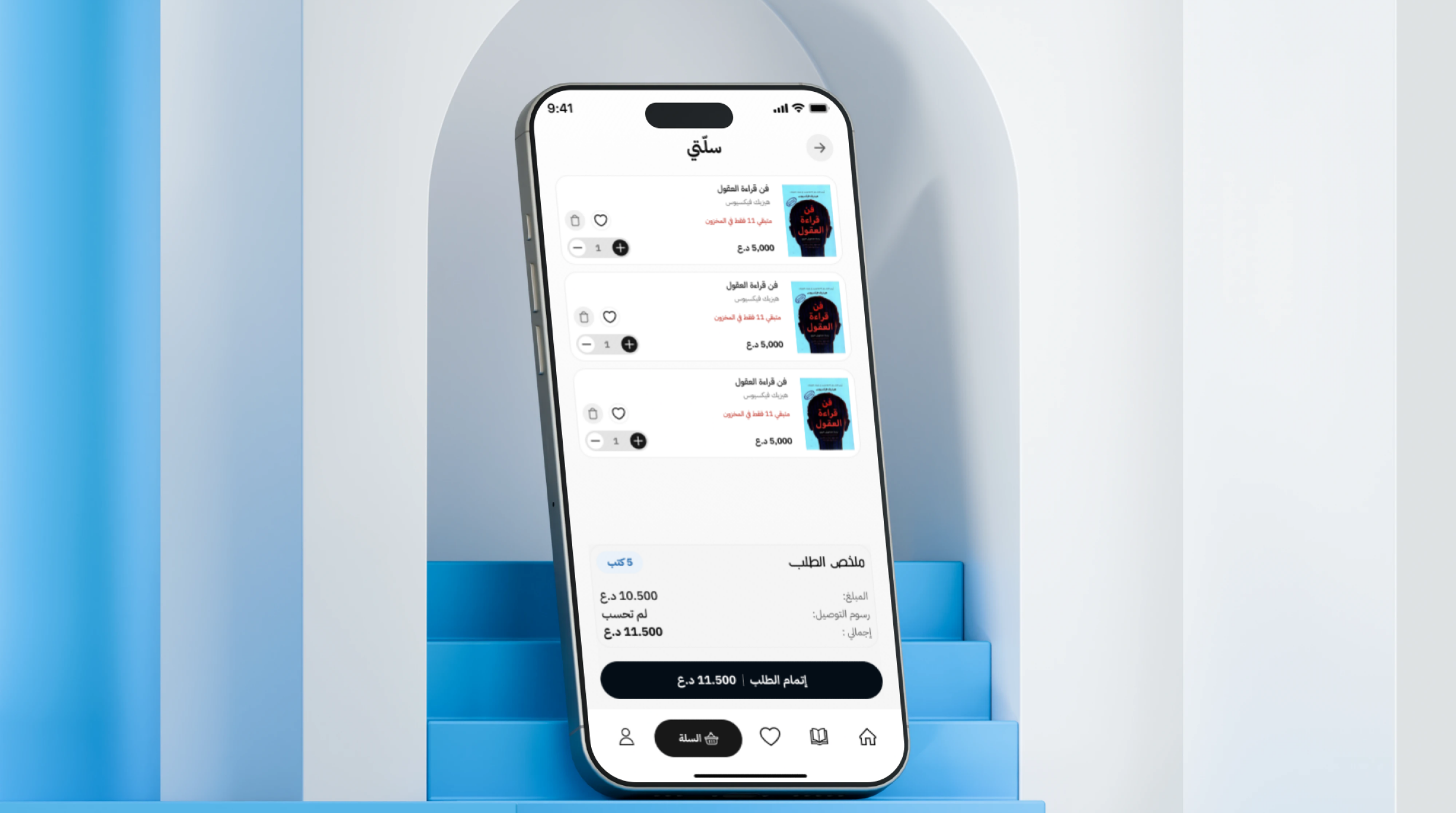
Shopping Cart
- Selected Book List: Display all chosen titles.
- Book Images: Show covers inside the cart.
- Book Prices: Present the price of each item.
- Quantity Controls: Increase or decrease copies.
- Item Removal: Remove a book from the order.
- Order Summary: Review products and delivery cost.
- Final Amount: Display the total before confirmation.
- Continue to Checkout: Open the delivery-information form.
Order Summary
- Product Subtotal: Display book cost before delivery.
- Delivery Fee: Present the shipping cost.
- Discounts: Display any applied reduction.
- Final Total: Calculate the complete order value.
- Item Count: Show the number of books and copies.
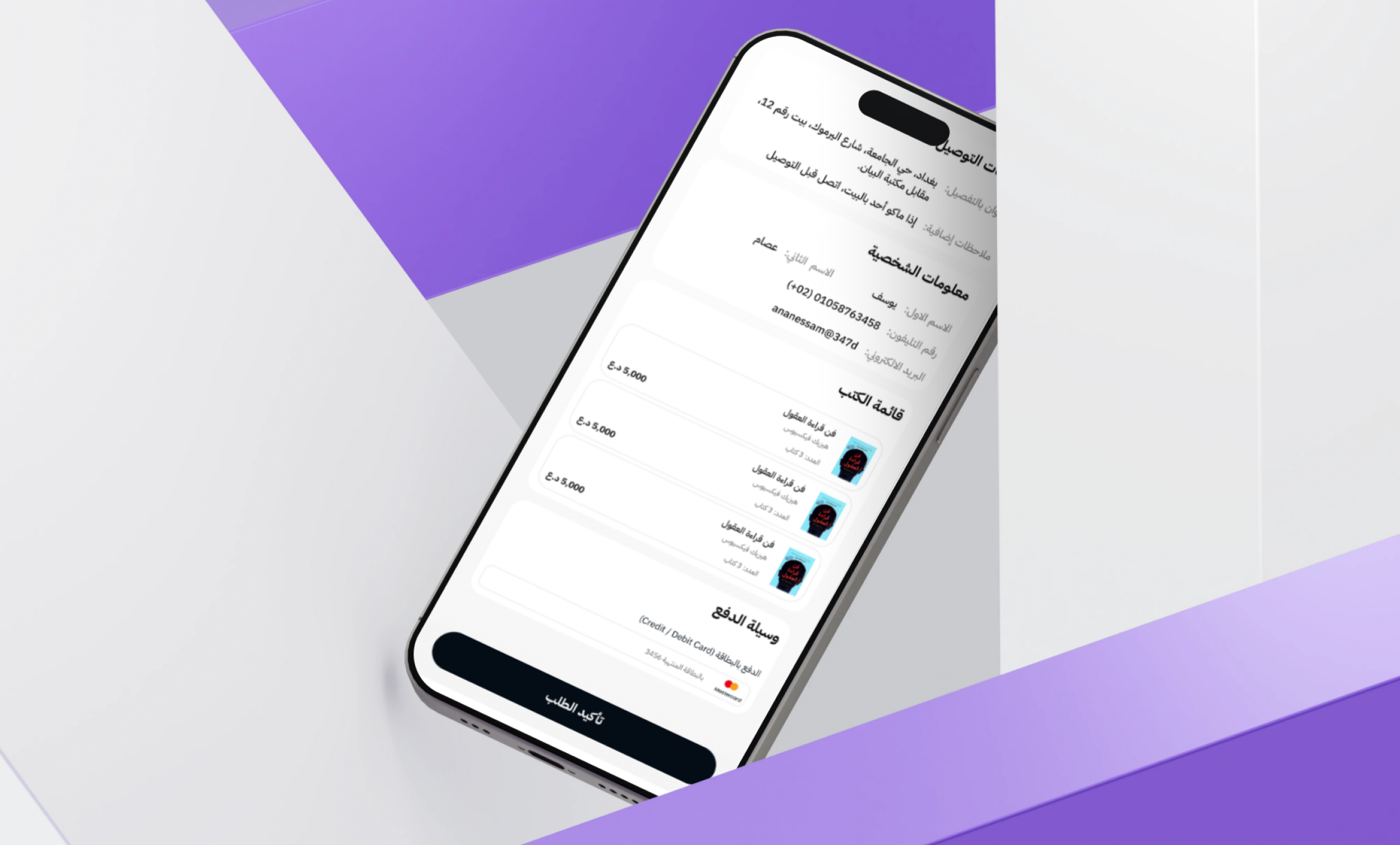
Checkout Information
- Customer Name: Enter the recipient’s name.
- Phone Number: Provide the main contact number.
- Additional Phone: Add an alternative number.
- Governorate or Region: Select the delivery area.
- Delivery Address: Enter the full destination.
- Street Details: Add location information.
- Nearest Landmark: Help the delivery team identify the address.
- Delivery Notes: Add additional instructions.
Delivery Information
- Recipient Name: Identify the person receiving the order.
- Primary Phone: Support delivery confirmation.
- Alternative Phone: Provide a backup contact method.
- Region or City: Define the general delivery location.
- Detailed Address: Add street, building, and unit details.
- Nearby Landmark: Improve delivery accuracy.
- Customer Notes: Store specific delivery instructions.
Order Confirmation
- Quantity Review: Confirm the requested number of copies.
- Book Review: Confirm the selected title.
- Purchase Confirmation: Create the order after review.
- Cancel Action: Return without submitting the purchase.
- Success Message: Confirm that the operation was completed.
Successful Order Screen
- Order Creation Confirmation: Inform the customer that the order was placed.
- Processing Information: Explain that the purchase is being prepared.
- Account Tracking: Direct customers to their order history.
- Continue Shopping: Return to book discovery.
- Return Home: Open the main application screen.
Notifications
- New Books: Inform customers about newly added titles.
- Order Updates: Communicate changes in order status.
- Delivery Progress: Follow preparation and delivery stages.
- Special Offers: Promote bookstore campaigns.
- Account Activity: Inform users about important account changes.
- Book Recommendations: Present personalised reading suggestions.
- Previous Order Updates: Send information related to existing purchases.
Empty Notifications State
- Clear Message: Explain that no notifications are available.
- Organised Visual State: Avoid a confusing empty list.
- Automatic Updates: Display new notifications when they arrive.
- Consistent Experience: Maintain polished design across all states.
Profile
- Personal Information: Review customer account details.
- Addresses: Manage saved delivery locations.
- Previous Orders: Review purchasing history.
- Notifications: Open account and order updates.
- Favourites: Access the saved reading list.
- Account Settings: Manage personal preferences.
- Language Settings: Control language options where configured.
- Password Management: Update login credentials.
- Logout: End the user session securely.
Personal Information
- Profile Image: Display or update the account image.
- Name: Edit the customer name.
- Email: Review or update the email address.
- Phone Number: Manage the primary contact method.
- Gender or Additional Details: Support configured profile fields.
- Account Information: Maintain customer-related data.
 |
 |
Address Management
- View Addresses: Review saved delivery locations.
- Add Address: Create a new destination.
- Edit Address: Update existing location information.
- Delete Address: Remove an unused destination.
- Checkout Selection: Use a saved address during purchasing.
- Frequent Locations: Accelerate future orders.
Password Recovery
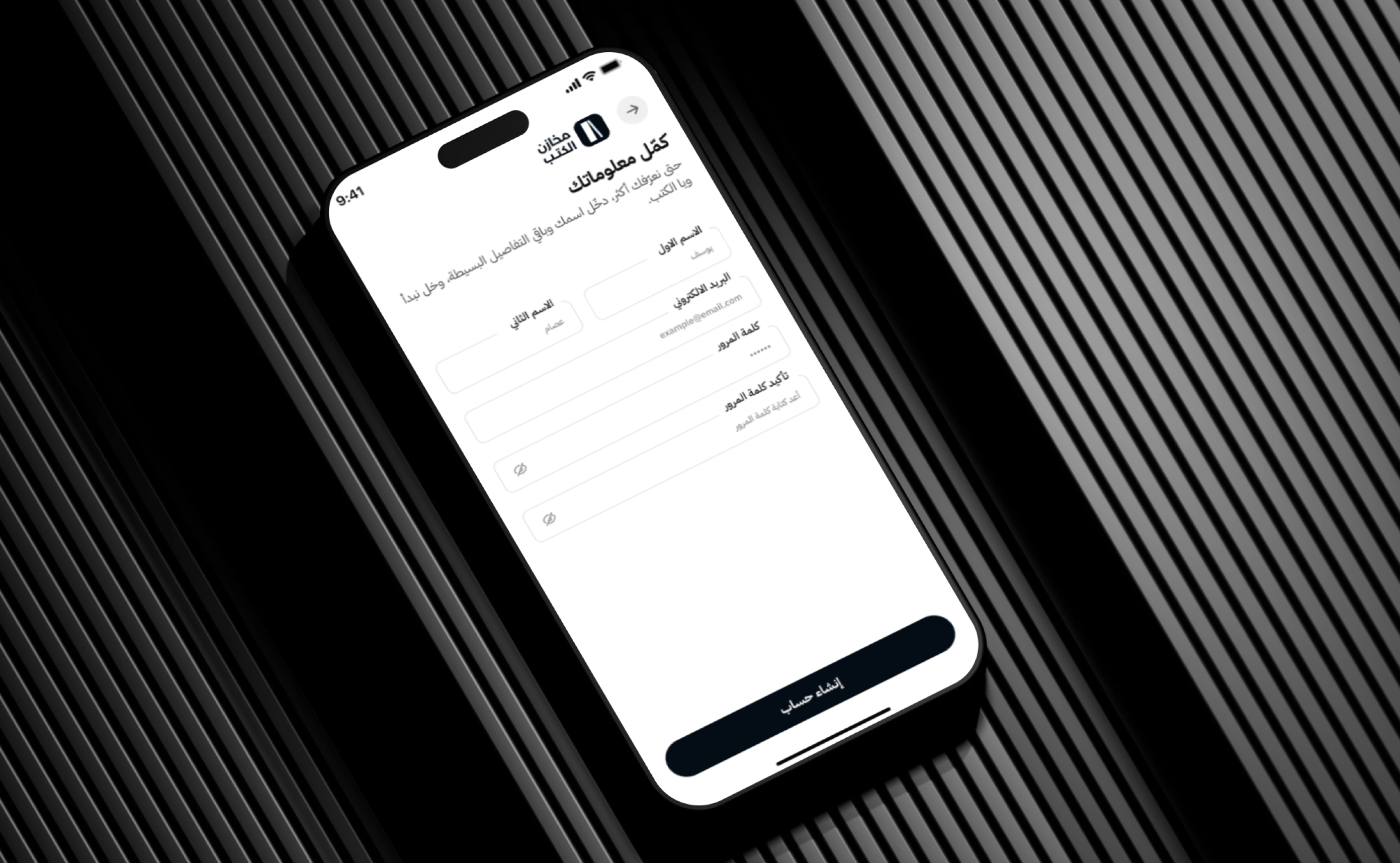
- Registered Phone: Enter the account phone number.
- Verification Code: Confirm ownership of the account.
- Code Entry: Submit the received one-time code.
- Account Confirmation: Validate the account before password changes.
- New Password: Create updated login credentials.
- Password Confirmation: Verify the entered password.
- Success Message: Confirm that the password was updated.
Verification Code
- Code Entry: Enter the verification value.
- Remaining Time: Display the code validity period.
- Resend Code: Request another verification code.
- Ownership Confirmation: Confirm that the phone belongs to the account.
- Continue: Open the new-password screen.
New Password
- New Password Field: Enter updated credentials.
- Password Confirmation: Re-enter the value.
- Visibility Control: Show or hide the password.
- Matching Validation: Prevent saving when the fields differ.
- Save Password: Complete the update.
Bottom Navigation
- Home: Return to book discovery.
- Books or Categories: Browse the catalogue.
- Favourites: Open the personal reading list.
- Shopping Cart: Review selected titles.
- Profile: Manage account information, addresses, and orders.
Empty States
- No Search Results: Present a message and alternative recommendations.
- No Books in Category: Explain that no matching titles are available.
- No Notifications: Display a clean empty state.
- Empty Favourites: Encourage users to save books.
- Successful Actions: Confirm order placement and password changes.
Administration Dashboard
- Book Management: Create and update book information.
- Book Cover Management: Upload title covers.
- Author Management: Maintain writers and connect them to books.
- Publisher Management: Organise publishing houses and their titles.
- Category Management: Create and update reading sections.
- Description Management: Maintain book summaries and information.
- Publication Year: Store release details.
- Pricing: Configure the price of every book.
- Stock Quantity: Track available copies.
- Recommended Books: Select promoted titles.
- Recently Added Books: Manage the new-title section.
- Homepage Banners: Update promotional content.
- Customer Accounts: Review users and profile information.
- Customer Addresses: Access delivery details connected to orders.
- Shopping Carts: Support operational review where required.
- Order Management: Review titles, quantities, and customer details.
- Order Status: Update processing and delivery stages.
- Notification Management: Send customer alerts.
- Favourite Books: Maintain related customer data where operationally needed.
- Search Recommendations: Manage suggested terms and results.
- Application Content: Update application pages and text.
- Onboarding Content: Manage introductory screens and visual assets.
Main User Types
Reader
Discovers books, browses categories, reviews title details, and builds a personal reading list.
Book Buyer
Adds books to the cart, enters delivery details, confirms orders, and follows purchasing updates.
Returning Customer
Uses saved information, addresses, favourites, and previous orders to complete purchases faster.
Literature and Culture Enthusiast
Explores novels, literature, history, philosophy, thought, biographies, and other reading categories.
Gift Buyer
Searches for suitable books, adds several titles to the cart, and orders them for delivery.
Store Administrator
Manages books, authors, publishers, categories, prices, stock, customers, orders, banners, recommendations, and notifications.
How the Customer Journey Works
- The user opens the Makhazen Al Kotob application.
- The splash screen introduces the bookstore identity.
- The user reviews the reading-focused onboarding screens.
- The user enters the home page.
- New and recommended books are discovered.
- The user searches for a title or selects a category.
- Filters are applied where required.
- The selected book details page is opened.
- The description, author, publisher, price, and publication information are reviewed.
- The book is saved, added to the cart, or purchased using Buy Now.
- The customer reviews the shopping cart.
- Book quantities are updated where required.
- Contact and delivery information is entered.
- The order summary and final cost are reviewed.
- The purchase is confirmed.
- The application creates the order.
- A successful confirmation message is displayed.
- The customer follows future updates through notifications and the profile.
Connected Digital Ecosystem
Customer Mobile Application
Provides book discovery, search, category browsing, favourites, cart management, checkout, and account access.
Book Catalogue
Organises books, covers, authors, publishers, categories, pricing, quantities, and descriptions.
Search and Discovery Engine
Manages search, suggestions, categories, filters, recently added books, and recommendations.
Commerce and Order System
Supports favourites, shopping cart, quantity management, order summary, delivery information, and purchase confirmation.
Customer Account System
Provides profiles, saved addresses, notifications, previous orders, and password recovery.
Administration Dashboard
Centralises books, content, customers, addresses, orders, notifications, banners, and application settings.
Business Value
- Creates an organised Arabic digital bookstore.
- Makes book discovery and selection easier.
- Reduces dependence on manual availability and price enquiries.
- Organises a large catalogue through categories and filters.
- Encourages reading through recommendations and onboarding content.
- Simplifies purchasing and delivery information collection.
- Supports repeat purchases through favourites and saved addresses.
- Provides transparent book information and pricing.
- Improves customer communication through notifications.
- Centralises books, customers, and orders.
- Provides a mobile-first experience for Arabic readers.
- Creates a scalable foundation for new books, authors, publishers, and categories.
Technology Overview
- Platform Type: Arabic book e-commerce mobile application.
- Primary Experience: Book discovery, search, categories, and purchasing.
- Navigation: Persistent bottom-tab navigation.
- Commerce Features: Cart, quantity management, checkout, and order confirmation.
- Customer Features: Profile, favourites, addresses, notifications, and password recovery.
- Discovery Features: Search, filters, categories, recommendations, and recently added books.
- Content Features: Book descriptions, author details, pricing, and publishing information.
- Localisation: Arabic right-to-left mobile interface.
- Architecture: Mobile storefront connected to a book catalogue, ordering system, customer accounts, and administration backend.
Project Highlights
- Arabic-first book shopping application.
- Branded bookstore splash screen.
- Reading-focused onboarding experience.
- Book discovery home page.
- Recently added books.
- Structured book categories.
- Advanced category filters.
- Search suggestions.
- Purpose-built empty search states.
- Detailed book pages.
- Quantity selection.
- Buy Now and Add to Cart.
- Personal favourites.
- Saved delivery addresses.
- Order confirmation and successful-order flow.
- Notifications and profile management.
- Complete password recovery workflow.
- Clean Arabic mobile interface.
Conclusion
The Makhazen Al Kotob project demonstrates Thotix’s ability to transform a traditional bookstore experience into an organised Arabic mobile commerce application.
By combining book discovery, categories, filters, search, detailed book information, favourites, shopping cart management, delivery details, customer profiles, notifications, and order confirmation, the application provides a complete experience for readers and book buyers.
The platform gives Makhazen Al Kotob a scalable digital foundation for adding new books, publishers, authors, customer services, and reading-focused features in the future.
Designed and developed by Thotix.
From Ancient Wisdom to Future Intelligence.